Swati Mishra

Updated last month

Understand your hardware without any hassle

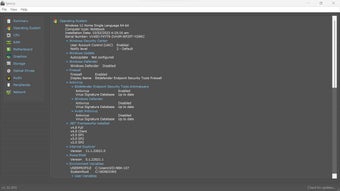
Speccy is a free, lightweight yet powerful tool designed to give you a complete look at what is inside your PC. It simplifies technical data into a readable format for everyone, so you no longer have to guess about your system's internal components or their current health.

Top Recommended Alternative

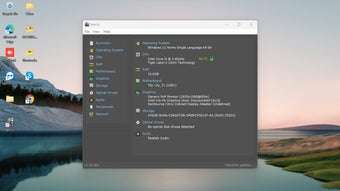
Whether you are a casual user or a tech professional, Speccy provides essential details about your CPU, RAM, and motherboard. It helps you make better decisions about your computer maintenance and future hardware upgrades without unnecessary complexity, making technical monitoring accessible to every skill level.

Advanced reporting

Speccy excels at providing instant, detailed reporting on your hardware. Unlike digging through Windows settings, it lays out everything from your graphics card model to storage health. It is incredibly fast and lightweight, ensuring your system performance is not hindered during the scan. This makes it the perfect starting point for anyone planning to upgrade their current machine or verify the specs of a new purchase.

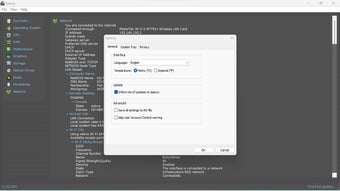
Beyond static stats, the program offers proactive problem-solving by displaying real-time temperatures for critical components. Monitoring your CPU or GPU temperature helps you spot potential hardware failures before they become costly issues. You can also save your scan results as snapshots or XML files. This is very handy when you need to share technical data with support teams or keep a record of your hardware configuration for future reference.

Versions and small compromises

Speccy is available in several versions to meet diverse user needs. At its core is the Free edition, which anyone can download at no cost to access detailed information about their PC’s. Additionally, there’s Speccy Professional, a paid upgrade that adds features such as automatic updates, priority technical support, and easier maintenance. In addition, this tool can be bundled with other CCleaner tools in broader packages, such as CCleaner Professional Plus.

While the tool is excellent, it does have a few minor drawbacks that users should consider. One issue is that the free version lacks automatic updates, which can be a bit tedious for those who want the latest version without manual effort. Additionally, some users find the interface feels slightly dated. However, these minor issues do not detract from the software's overall reliability and accuracy.

A must-have tool for PC maintenance

Overall, Speccy remains a top-tier choice for anyone needing a quick, in-depth look at their computer's internal hardware. It balances simplicity with technical depth beautifully. While the Pro version offers priority support, the free edition provides more than enough information for most home users. It is a trustworthy, informative tool that belongs in every Windows user’s utilities folder to improve PC maintenance.


Swati Mishra

Swati has over a decade of experience in content strategy, SEO, and editorial writing across technology and travel. She specializes in technical reviews, structured guidelines, and long-form pieces. Her work focuses on clear organization, search intent, and practical takeaways for readers evaluating software and digital tools.

  • Pros

    • Detailed real-time temperature monitoring
    • Fast and lightweight system impact
    • Easy snapshot sharing for support
    • User-friendly and clean interface
  • Cons

    • The free version does not include automatic updates
    • Interface design can feel slightly dated
 0/3

App specs

Program available in other languages


User reviews about Speccy

4

5 reviews

Add review

Main reviews for you

  • Anonymous user

    One of the best program what i found in the last days softonic is the best heat the road softonic

  • Anonymous user

    One and the Only. Best "one and the only"this tells you everything you need to know and its easy to use. Pros: It tells everything i need to knowEasy to use Cons: Does not work 100% well with laptops

  • Anonymous user

    Awesome!. This app displays all the necessary information about your PC in a novice-friendly manner. Just like what CCleaner does with cleaning your PC. Pros: Displays all the necessary informationEasy to use Cons: Everything is great!

  • Anonymous user

    One and only. Great! Displays all the necessary info. Works in a very simple manner. This is a much better way to learn about the PC you have than through the Control panel. Pros: Displays all the info you needEasy to use Cons: I wish it also showed some drivers info

  • Anonymous user

    More info than you would ever need. great program,provides more info than you would ever need,and its free.not to mention that theres a no install version Pros: lots of infofreein every language imagninable Cons: locks up and crashes on non admin accs

More

You may also like

Alternatives to Speccy

Explore Apps

Latest articles

Laws concerning the use of this software vary from country to country. We do not encourage or condone the use of this program if it is in violation of these laws. Softonic may receive a referral fee if you click or buy any of the products featured here.
Softonic

Is Speccy safe?

100/100

Score result: Clean

This file passed a comprehensive security scan using VirusTotal technology. It is safe to download.

  • Virus free
  • Spyware free
  • Malware free
  • Verified by Security Partners

    VirusTotal logo

Scan Info

Last scan
Friday, May 2, 2025
Scan provider
VirusTotal · Full report

File Integrity

File
spsetup133.exe
SHA256
03c35fcb1d10cf478c0b9896699937e6e262daa4f4a4353a7cc56b238fe86892
SHA1
938c2d249c9bf7978b4828b9028b95b122ceefc3

Softonic security commitment

Speccy has been thoroughly scanned by our advanced security systems and verified by industry-leading partners. This file comes from the official developer and has passed all our security checks, showing no signs of viruses, malware, or spyware. For more information, visit our Security and Trust Center